Mark Weinstein Admin
Hi Everyone,
Sometimes people ask us – What makes MeWe different from other social networks? What is MeWe all about? What can I do on MeWe? 🤔
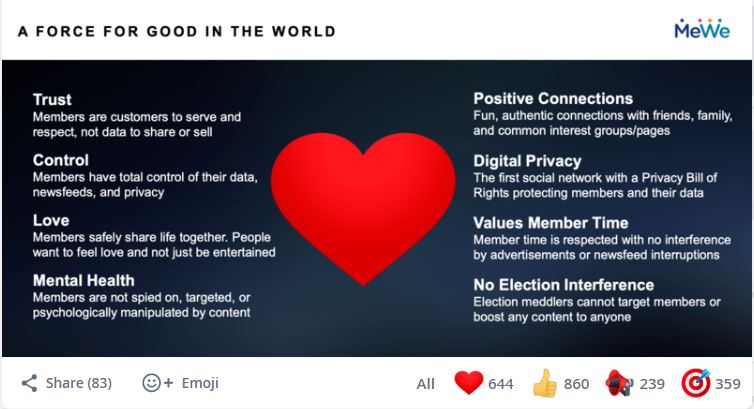
MeWe is the social network of the future with all the best social features along with No Ads, No Targeting, No Political Bias, No Newsfeed Manipulation, and No BS! 👍❤
If you’re new to MeWe – here’s how to get started! 👇
1) Invite Your Friends and Family 👨👩👧👦 💃🕺
a. You can easily upload your address book and invite your friends, family, and colleagues to join you on MeWe.
b. You can also sync your contacts to find people you know who are already on MeWe! Here’s how:
On Desktop 🖥
1⃣ Click your profile pic at the top right corner of your Home screen
2⃣ Select “My Contacts”
3⃣ Select “Invite New Friends to MeWe”
4⃣ Upload your address book to invite your friends
5⃣ Select “Sync Contacts” to connect with friends who are already on MeWe
On Mobile 📱
1⃣ Tap the “More” tab (circle icon, bottom right corner)
2⃣ Tap “Invite New Friends to MeWe”
3⃣ Tap “Add and Invite Friends”
2) Join/Create MeWe Open Groups 🚴🏌 🧗🏼 🥁
With MeWe Open Groups, you can make new friends, find like-minded peeps, and explore new Interests.
a. Go to the MeWe Open Group Directory (available on both desktop and mobile) where you can choose from THOUSANDS of MeWe Open Groups started by members just like you, and join as many as you’d like or start your own. 🙂
3) Create your MeWe Private Groups 👯 🏈🎨 🏄
a. Create MeWe Private Groups which are perfect for connecting privately with friends and family. 🏌♂ 🏌♀
On Desktop 🖥
1⃣ Select “Groups” at the top left of your Home screen
2⃣ Select “New Group”
3⃣ Fill in your group info and then select “Private”
On Mobile📱
1⃣ Select the “Communities” tab (triangle icon, bottom left)
2⃣ Select the blue “+” icon at the bottom right
3⃣ Select “New Group”
4⃣ Fill in your group info and then select “Private”
4) Follow MeWe Pages 🎬 🎷 🎭
Want to follow celebrities, public figures, artists, and brands on MeWe? Check out MeWe Pages!
a. Go to our Featured Pages section (on both desktop and mobile) or explore our various page categories and follow as many pages as you like for FREE. 😻
5) Create a MeWe Page for your followers 📢 🤩 💼
As a MeWe Page owner, 100% of your posts reach 100% of your followers, in the order you post them. No ads or algorithms get in the way! Compare that to Facebook, where pages only reach 5% or less of their followers because of FB’s stifling algorithms. 👎
a. Your page will be listed on MeWe and also have a link to share everywhere online to bring your followers to MeWe. 💯 📢 👀
On Desktop 🖥
1⃣ Select “Pages” at the top left of your Home screen
2⃣ Select “New Page”
On Mobile 📱
1⃣ Select the “Communities” tab (triangle icon, bottom left)
2⃣ Select the blue “+” icon at the bottom right
3⃣ Select “New Page”
6) Enjoy All These Awesome Social Features “Free Forever” 🙌
☑️ Profiles – Express yourself on MeWe with your customized profile 😎
☑️ Newsfeeds – Follow newsfeeds for your contacts, Close Friends, groups, and pages 👀
☑️ Chats – Have a blast chatting 1:1 and in groups with your friends 🗣
☑️ Custom Camera – Make memes, GIFs, and more with MeWe’s Custom Camera 📸
☑️ MeWe Groups – Join and create Open and Private Groups 👯
☑️ Following Pages – Follow as many pages as you like! 🤩
☑️ Voice Messaging – Share audio messages with this unique to MeWe feature 🎙
☑️ Stories – Create slideshow Stories of your day that disappear after 24 hours ✨
☑️ Disappearing Content – create awesome Me’s (selfie camera) and We’s (outward-facing) that disappear in 24 hours
☑️ Dual-Camera MeWe Videos – Create and share videos using your iPhone’s front/back cameras simultaneously with this unique to MeWe feature 🤳
☑️ Emojis + Stickers – Enhance your posts with thousands of awesome free emojis and stickers 😻
☑️ Much More! 👏
7) MeWe is 100% Member-Supported. 🙏
MeWe is Free Forever with No Ads and There’s More to Love!
MeWe Premium Gives You:
✅ Video Journals for Your Stories 🤳
✅ Unlimited Voice and Video Calling 📱
✅ Unlimited Custom Emojis and Stickers 😻
✅ Unlimited Custom Themes ✨
✅ 100GB of MeWe Cloud Storage (8GB is Free) ☁️
✅ The cool MeWe Premium Profile Badge 💎
a. Upgrade to MeWe Premium for just $4.99 per month (valued at $30+ per month and the first 30 DAYS FREE, CANCEL ANYTIME). 💎
MeWe Premium and all of our a-la-carte enhancements can be purchased in the MeWe Store – check it out:
On Desktop: Go to https://mewe.com/store
On Mobile: Click on your “More” tab (bottom right corner, circle icon) then select “MeWe Store”
MeWe is SOCIAL DONE RIGHT. 🎯
LET’S MeWe! 🎉🥂🥳


Leave a Reply